Il Timer Class implementa un timer con il quale viene generato un evento a intervalli definiti dall’utente. Questo timer è ottimizzato per l’uso in applicazioni Windows Forms e deve essere usato in una finestra. Nell’esempio seguente viene implementato un timer di intervallo semplice, che imposta un allarme ogni cinque secondi. Quando si verifica l’allarme, un MessageBox visualizza un conteggio del numero di volte in cui l’allarme è stato avviato e chiede all’utente se l’esecuzione del timer deve continuare.
public class Class1 {
    static System.Windows.Forms.Timer myTimer = new System.Windows.Forms.Timer();
    static int alarmCounter = 1;
    static bool exitFlag = false;

    // This is the method to run when the timer is raised.
    private static void TimerEventProcessor(Object myObject,
                                            EventArgs myEventArgs) {
       myTimer.Stop();

       // Displays a message box asking whether to continue running the timer.
       if(MessageBox.Show("Continue running?", "Count is: " + alarmCounter,
          MessageBoxButtons.YesNo) == DialogResult.Yes) {
          // Restarts the timer and increments the counter.
          alarmCounter +=1;
          myTimer.Enabled = true;
       }
       else {
          // Stops the timer.
          exitFlag = true;
       }
    }

    public static int Main() {
       /* Adds the event and the event handler for the method that will
          process the timer event to the timer. */
       myTimer.Tick += new EventHandler(TimerEventProcessor);

       // Sets the timer interval to 5 seconds.
       myTimer.Interval = 5000;
       myTimer.Start();

       // Runs the timer, and raises the event.
       while(exitFlag == false) {
          // Processes all the events in the queue.
          Application.DoEvents();
       }
    return 0;
    }
 }
Invece la classe BackgroundWorker esegue un’operazione su un thread separato. Nell’esempio di codice riportato di seguito vengono illustrate le nozioni di base della classe BackgroundWorker per eseguire un’operazione che richiede molto tempo in modo asincrono. Nell’illustrazione seguente viene illustrato un esempio dell’output.
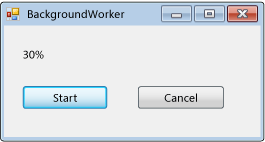
Per provare questo codice, creare un Windows Forms Application. Aggiungere un controllo Label denominato resultLabel e aggiungere due controlli Button denominati denominati startAsyncButton e cancelAsyncButton. Creare Click gestori eventi per entrambi i pulsanti. Dalla scheda componenti della casella degli strumenti aggiungere un componente BackgroundWorker denominato backgroundWorker1. Creare i gestori eventi DoWork, ProgressChangede RunWorkerCompleted per la BackgroundWorker. Nel codice del modulo sostituire il codice esistente con il codice seguente.
using System;
using System.ComponentModel;
using System.Windows.Forms;

namespace BackgroundWorkerSimple
{
    public partial class Form1 : Form
    {
        public Form1()
        {
            InitializeComponent();
            backgroundWorker1.WorkerReportsProgress = true;
            backgroundWorker1.WorkerSupportsCancellation = true;
        }

        private void startAsyncButton_Click(object sender, EventArgs e)
        {
            if (backgroundWorker1.IsBusy != true)
            {
                // Start the asynchronous operation.
                backgroundWorker1.RunWorkerAsync();
            }
        }

        private void cancelAsyncButton_Click(object sender, EventArgs e)
        {
            if (backgroundWorker1.WorkerSupportsCancellation == true)
            {
                // Cancel the asynchronous operation.
                backgroundWorker1.CancelAsync();
            }
        }

        // This event handler is where the time-consuming work is done.
        private void backgroundWorker1_DoWork(object sender, DoWorkEventArgs e)
        {
            BackgroundWorker worker = sender as BackgroundWorker;

            for (int i = 1; i <= 10; i++)
            {
                if (worker.CancellationPending == true)
                {
                    e.Cancel = true;
                    break;
                }
                else
                {
                    // Perform a time consuming operation and report progress.
                    System.Threading.Thread.Sleep(500);
                    worker.ReportProgress(i * 10);
                }
            }
        }

        // This event handler updates the progress.
        private void backgroundWorker1_ProgressChanged(object sender, ProgressChangedEventArgs e)
        {
            resultLabel.Text = (e.ProgressPercentage.ToString() + "%");
        }

        // This event handler deals with the results of the background operation.
        private void backgroundWorker1_RunWorkerCompleted(object sender, RunWorkerCompletedEventArgs e)
        {
            if (e.Cancelled == true)
            {
                resultLabel.Text = "Canceled!";
            }
            else if (e.Error != null)
            {
                resultLabel.Text = "Error: " + e.Error.Message;
            }
            else
            {
                resultLabel.Text = "Done!";
            }
        }
    }
}
Metodi di estensione: consentono agli sviluppatori di aggiungere funzionalità personalizzate ai tipi di dati già definiti senza creare un nuovo tipo derivato. I metodi di estensione consentono di scrivere un metodo che può essere chiamato come se fosse un metodo di istanza del tipo esistente. Un metodo di estensione può essere solo una routine Sub o una procedura di Function. Non è possibile definire una proprietà, un campo o un evento di estensione. Tutti i metodi di estensione devono essere contrassegnati con l’attributo di estensione <Extension> dallo spazio dei nomi System.Runtime.CompilerServices e devono essere definiti in un modulo. Se un metodo di estensione viene definito all’esterno di un modulo, il Visual Basic compilatore genera l’errore BC36551, “i metodi di estensione possono essere definiti solo nei moduli”. Il primo parametro di una definizione di metodo di estensione specifica il tipo di dati che il metodo estende. Quando viene eseguito il metodo, il primo parametro viene associato all’istanza del tipo di dati che richiama il metodo. È possibile applicare l’attributo Extension solo a una Visual Basic Module, Subo Function. Se lo si applica a una Class o a un Structure, il compilatore Visual Basic genera l’errore BC36550, l’attributo “extension” può essere applicato solo alle dichiarazioni ‘ Module ‘,’ Sub ‘ o ‘ Function ‘ “.
 statistica applicata